Preprint Initial findings from the DecodeME genome-wide association study of myalgic encephalomyelitis/chronic fatigue syndrome, 2025, DecodeMe Collaboration

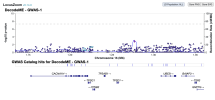
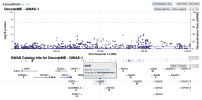
For members that are interested in exploring the data from DecodeME, such as to see if certain genes are near significant loci, here is a link to the summary stats on LocusZoom: https://my.locuszoom.org/gwas/894183/

I wasn't sure if I could share it publicly, but Chris Ponting kindly pointed out that the summary stats are released under a CC-By Attribution 4.0 International license, so sharing is allowed.

As an example of how to use LocusZoom to look at a gene:
  1. Find the location of a gene of interest. One way is to go the GeneCards page for a gene, scroll down to the section that says "Genomic Locations for ... Latest assembly", and copy the location which looks like this: 'chr6:31,575,565-31,578,336'
  2. Click the link that says "region page" on the LocusZoom page above. Paste the gene location you copied into the search box and press Enter, and it'll take you to the gene.
  3. You can zoom in or out by pressing Shift while 'scrolling' (e.g. drag two fingers on laptop touch pad or spin wheel on mouse).

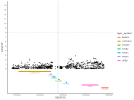
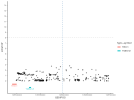
Download gwas_1.regenie.gz and gwas_qced.var.gz from OSF, run this code in a terminal in the same folder as the files to make a file suitable for LocusZoom, then upload to LocusZoom and set options as indicated in screenshots.
Bash:
# Filters to only QCed variants, removes non-needed columns, then sorts. Deletes intermediate files at the end.
summary_stats_file='./gwas_1.regenie.gz'
qced_var_file='./gwas_qced.var.gz'

awk 'FNR==NR {if (FNR>1) ids[$1]++; next} FNR==1 || ($3 in ids)' <(zcat "$qced_var_file") <(zcat "$summary_stats_file") > gwas_1_filtered.txt

awk 'BEGIN { OFS = "\t" } {print $1, $2, $4, $5, $6, $13, $14, $16}' gwas_1_filtered.txt > gwas_1_minimal.txt

awk 'NR==1; NR>1 {print $0 | "sort -k1,1n -k2,2n"}' gwas_1_minimal.txt | gzip > gwas_1_sorted.txt.gz

rm gwas_1_filtered.txt gwas_1_minimal.txt

The script makes a file called gwas_1_sorted.txt.gz, which you would upload to LocusZoom. These are the options I set while uploading:
Screenshot from 2026-01-19 20-59-15.png Screenshot from 2026-01-19 20-59-38.png
 
Last edited:
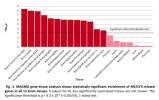
I posted in another thread, but I think this is notable enough to mention here. In a large GWAS (122,341 European ancestry cases and 729,881 controls) of anxiety-related traits (GAD, panic disorder, social phobia, agoraphobia or specific phobias), MAGMA tissue enrichment was tested.

The four most significant tissues are the same as in DecodeME, and in the same order: Frontal Cortex, Cortex, Anterior Cingulate Cortex BA24, Nucleus Accumbens.

Maybe this indicates that similar brain structures are affected in both types of disorder.
1770505694322.png


Supplementary Figure 89: MAGMA tissue expression analysis to test tissue enrichment of 53 specific tissue types for ANX genes (derived
from the main ANX GWAS meta-analsis (Ncases = 122,341, Ncontrols = 729,881)).

From DecodeMe:
1755126187821.png
 
The four most significant tissues are the same as in DecodeME, and in the same order: Frontal Cortex, Cortex, Anterior Cingulate Cortex BA24, Nucleus Accumbens.

Maybe this indicates that similar brain structures are affected in both types of disorder.

I wonder if we could ask the question the other way round: what traits or disorders are associated with these brain regions, in this order of ranking?

(Possibly not, just thinking aloud.)
 
I wonder if we could ask the question the other way round: what traits or disorders are associated with these brain regions, in this order of ranking?
I think it's likely that it's not actually all these brain regions affected in these disorders. Similar genes are expressed in different parts of the brain, so if only one brain region is actually causal (say, frontal cortex) and thus is significant in MAGMA, then I think it's possible that other brain regions will be significant too just from having similar patterns of gene expression to the frontal cortex.

But the main thing of interest, I think, is that the pattern of GWAS genes in the two disorders is so similar that the same top four tissues were significant in both. Though, which, if any (maybe all), of these four tissues are actually relevant, is probably still an open question.

We could look for similar patterns in MAGMA analyses in other disorders, which I did yesterday, and none but anxiety, of the MAGMA plots I previously compiled, look to be quite so similar.

[Edit: Realizing now that the last part is probably all you were asking anyway.]
 
Last edited:
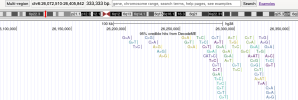
I made a quick little custom track for looking at DecodeME hits on UCSC genome browser, which allows you to cross-reference with a lot of other databases to find out some more interesting information about top variants beyond just what genes they are near.

[Edit: the magic of the internet is real and apparently all these steps are already embedded in the link I provided. I'll move all the additional instructions to a spoiler just for future reference]

Go to UCSC genome browser

At the bottom of the main window, click the middle button that says "Add custom tracks":
1772167360298.png


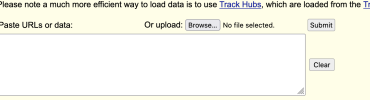
Above the first text box hit "Browse" and upload the file attached at the end of the post (DecodeME_CredibleSet_UCSC_custom_track.txt), then click "Submit":
1772167416718.png

Click "Go to first annotation" to jump back to the viewer window:1772167578610.png

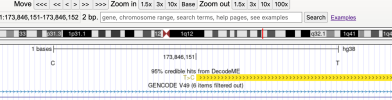
You will end up very zoomed in to the location of the first variant. You can hit "Zoom out" 3x or 10x at the top right a couple times to get a wider view and orient yourself. The DecodeME annotations will default to populating at the top row of the window.

1772210963805.png

I had to narrow down the number of hits to plot, so this file only includes hits in the 95% credible set as calculated by LocusZoom (i.e. we rarely know exactly which variants are the "causal" ones for disease because nearby ones tend to be inherited together, but we can be 95% confident that the real causal variants are within that "credible set"). Not all "peaks" and genes discussed in the DecodeME results were included in the credible set, so only hits around 6 loci (on chr1, chr6p, chr6q, chr15, chr17, chr20) are in the custom track.

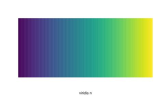
I'm a bit limited in what visual features I could code into the track, but I wanted to give a sense of which hits had the strongest signal within specific areas of interest. Variants are colored by -log10(p-value), scaled for the local maximum according to the viridis color scale:

1772168096911.png
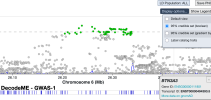
Meaning that only the green-colored dots from the LocusZoom plot below will be plotted in the UCSC genome browser track, with the highest dot colored yellow and the lowest dot colored dark purple in the UCSC track:
1772211479118.png

1772211845570.png
A bit clunky but hopefully still helpful.

The file is formatted as a bedDetail, a tab-delimited file with columns as follows:
chrom (chromosome)
chromStart (1 to the left of the "Pos" in the DecodeME summary stats)
chromEnd ("Pos" in the DecodeME summary stats)
name (name for the site, given as the Ref > Alt alleles)
score (colorscale greyness)
strand (always positive)
thickStart (same as chromStart, just designating a "thick" line)
thickEnd
rgb (RGB color code, according to local relative p-value)
ID (arbitrary row number)
description (additional details about the variant that appear when you click on an element from the track)

It's easy to add new sites to the track as new rows, so long as you keep the same formatting. I would not recommend messing with the file header or the columns.

There's an abundance of different data you can include in your window on UCSC genome browser. At minimum I'd recommend "MANE", "NCBI RefSeq" or "GENCODE V49" under the section "Genes and Gene Predictions" to show you the location of genes.

Change the drop-down menu from "hide" to "dense" to have it appear in your window--the other options just determine how much space the track takes up in your window. You'll need to click the "Refresh" button on the right hand side of the section header to have it show up in your window.

To better see how a DecodeME variant overlaps with info on other tracks, place your cursor all the way at the top of the window and click-and-drag to highlight a region of interest. In the pop-up window, click "Add highlight." Alternatively, you can zoom the window until the site you're interested in fills the whole screen, and click "Highlight" from the list of buttons at the bottom of the window.

Some other tracks I use frequently:
Genes and Gene Predictions
Non-coding RNA - shows regions that don't code for proteins but might code for important regulatory RNA.

Phenotypes, Variants, and Literature
OMIM - a genetics database that can show you if a location in the genome is associated with other diseases/traits/etc.

Expression
GTEx Gene V8 - under genes that code for detectable mRNA, this shows you a handy little barplot with relative steady-state expression levels across tissues (measured from a tissue bank).

Regulation
ENCODE cCREs - highlights cis-regulatory elements, like promoters, enhancers, and CTCF binding sites. Can be useful to tell if a SNV falls within a hotspot where a lot of transcription factor binding and gene regulation happens.

JASPAR Transcription Factors - a database of transcription factor binding motifs. Can tell you if a SNV overlaps the place in the genome where particular transcription factors bind. Note this goes off of the reference genome, so it will not show you if a given SNV adds in a TF binding site that isn't already there in the hg38 reference. Also note this isn't proof that a given transcription factor does bind there in any given cell type, just that it theoretically can.

library(tidyverse)
library(magrittr)
library(data.table)
library(colourvalues)

# Load summary stats
# Inputs are 6 csv files manually exported from jumping to top loci at LocusZoom
files <- list.files(workDir,
pattern = ".csv")

regions <- files %>%
str_split_i(pattern = "_",
i = 2)

summary_stats <- files %>%
map(\(x) read_csv(x)) %>%
set_names(regions)

# Filter to credible set
summary_stats %<>%
map(\(x) x %>%
as.data.table() %>%
.[`Cred. set` == TRUE])

# Bind rows
summary_stats %<>% rbindlist(idcol = "region")

# Rename some columns
summary_stats %<>% setnames(old = c("Chrom", "Pos", "-log<sub>10</sub>(p)", "&beta;", "Alt freq."),
new = c("chrom", "chromEnd", "neglog10pval", "beta", "alt_freq"))

# Format chrom column
summary_stats %<>% .[, chrom := paste0("chr", chrom)]

# Add start position
summary_stats %<>% .[, chromStart := chromEnd - 1]

# Create name
summary_stats %<>% .[, name := paste0(Ref, ">", Alt)]

# Create description
summary_stats %<>% .[, desc := paste0("rsID=",
rsID,
"; Beta=",
signif(beta, 4),
"; -log10(pval)=",
signif(neglog10pval, 3),
"; alt freq=",
alt_freq)]

# Around each peak, scale color values into 8 bins (8 is color limit) and assign RGB code
summary_stats %<>% .[, color_bin := cut_number(neglog10pval, n = 8) %>%
as.numeric(),
by = "region"] %>%
.[, color := colour_values_rgb(color_bin,
include_alpha = F) %>%
apply(MARGIN = 1, \(x) paste(x, collapse = ","))]

# Add ID
summary_stats %<>% .[, ID := 1:nrow(.)]

# Add score
summary_stats %<>% .[, score := 999] %>%
.[, strand := "+"]

# Pull columns for BED file
BED <- summary_stats %>%
.[, c("chrom",
"chromStart",
"chromEnd",
"name",
"score",
"strand",
"chromStart",
"chromEnd",
"color",
"ID",
"desc")]

# Add track header as column names
header <- c("track name=DecodeME",
"type='bedDetail'",
"description='95% credible hits from DecodeME'",
"db=hg38",
"visibility=3",
"itemRgb='On'",
"",
"",
"",
"",
"")

BED %<>% setnames(header)

# Save as tab delimited file
write_delim(BED,
file = file.path(workDir,
"DecodeME_CredibleSet_UCSC_custom_track.txt"),
delim = "\t")
 

Attachments

Last edited:
Oh nice I didn't realize it could save a custom track within a URL. I'll update the link to a version that's a little less busy with a few of my recommended tracks.
Really useful to have the BED detail file and instructions anyway so thank you. Learning how to do custom tracks is on my todo list after you pointed out some of the Genome Browser features elsewhere recently, but having an example will help a lot!
 
Back
Top Bottom